

Om in 2026 een succesvol faceless YouTube-kanaal te starten, kies je een nauwkeurig gedefinieerde kijkerresultaat, creëer je drie tot vijf originele video's rondom dat resultaat en gebruik je een herhaalbaar productieproces dat je onderzoek, scripts, visuele keuzes, rechtencontroles en eindbeoordelingen vastlegt. Publiceer Shorts om individuele vragen te testen en publiceer lange video's wanneer een vraag uitleg, voorbeelden of een beslissingskader nodig heeft. Een faceless kanaal heeft geen host voor de camera, dure apparatuur of een enorme lanceringbibliotheek nodig; het heeft wel originele redactionele oordelen, nauwkeurige claims, relevante visuals en een format nodig dat nuttig blijft, zelfs als een andere maker dezelfde software gebruikt.
Belangrijke punten:
- Een officiële productaankondiging van Google meldt dat YouTube Shorts gemiddeld 200 miljard dagelijkse weergaven heeft, waardoor Shorts een grote ontdekkingsoppervlakte is voor een nieuw kanaal. Google
- Gebruik geen universele RPM-figuur om een faceless niche te kiezen. Omzet per duizend weergaven varieert materieel op basis van de geografie van het publiek, de vraag van adverteerders, seizoen, format en kijkerintent; plan lange video's voor diepgang en voortgang van het publiek in plaats van een gerapporteerd RPM-bereik als garantie te beschouwen.
- Het monetisatiebeleid van YouTube zegt: “Inauthentieke inhoud is inhoud die massaal geproduceerde of repetitieve inhoud is.” YouTube Help
- YouTube zegt dat hun systemen labels kunnen toepassen wanneer ze significant AI-gebruik in een video detecteren. YouTube Nieuws
- Een praktische standaard voor verticale video-productie is 9:16 bij 1080 × 1920 pixels. Shorts beste-praktijkenhandleiding
Vereisten en realistische tijdlijn: Voordat je gaat opnemen, reserveer je een kanaalnaam, stel je een Google-account in, kies je een eenvoudige thumbnail en bijschriftstijl en schrijf je 10 vragen die een specifiek publiek echt zou stellen. Gebruik een gefocuste week om de kanaalbelofte te definiëren en voltooi een eerste batch van drie tot vijf video's. Gebruik de eerste maand om te vergelijken welke vragen klikken, commentaren en aanhoudend kijken genereren, en herzie dan de volgende batch. Stel de lancering niet uit voor een perfect studio, dure apparatuur, een uitgebreid logo-pakket of een achterstand van 50 video's; stel alleen uit als het kanaal nog niet kan uitleggen wie het dient en wat elke video dat publiek helpt te doen.
Wat zijn de belangrijkste trends voor faceless YouTube-kanalen in 2026?
Stap 1 — Bouw een kanaal rond een smalle kijkerresultaat, niet rond anonimiteit. Een faceless YouTube-kanaal heeft succes wanneer een kijker het praktische resultaat van het kanaal kan identificeren voordat de kijker weet wie het beheert. De relevante operationele voorwaarde in 2026 is niet dat elk faceless format zal groeien; het is dat YouTube Shorts een groot ontdekkingsformaat blijven, met een officiële Google-aankondiging die 200 miljard gemiddelde dagelijkse Shorts-weergaven rapporteert. Google Een duurzaam kanaalontwerp gebruikt korte verticale video's om precieze vragen te testen en gebruikt langere video's om de vragen te verklaren die meer bewijs, context en stappen verdienen.
Actie: Schrijf een kanaalbelofte in één zin met dit formaat: “Ik help [specifiek publiek] [specifiek resultaat] te bereiken door middel van [herhaalbaar format].” Bijvoorbeeld: “Ik help freelancers die voor de eerste keer aan het werk zijn de problemen van klanten te begrijpen via geïllustreerde visuele casestudies.” Het publiek in dat voorbeeld is niet “mensen die geïnteresseerd zijn in business”; het publiek is freelancers die voor de eerste keer aan de slag gaan. Het resultaat is niet “business leren”; het resultaat is het begrijpen van de klantproblemen. Het format is niet “video's”; het format is geïllustreerde visuele casestudies.
Lijst nu 10 video vragen die bij dezelfde belofte passen. Een nuttige set moet een publiek, beslissing of terugkerend obstakel delen. Voor het freelancer voorbeeld kunnen de vragen zijn: “Wat betekent een vage klantbrief?”, “Hoe kan een freelancer de beslisser identificeren voordat een kickoff-gesprek?” en “Welk deel van een voorstel maakt dat een klant om een korting vraagt?” Een gratis bibliotheek met ideeën voor faceless-video-onderwerpen kan helpen om een niche om te zetten in invalshoeken, maar de uiteindelijke onderwerpenlijst moet uit de belofte van het kanaal komen en niet uit de uploadgeschiedenis van een andere maker.
Wat het vereist: Gebruik één publiek, één onderwerpgebied en één kernformat voor de eerste 10 uploads. Een kanaal kan zijn visuele behandeling variëren tussen schermopnames, diagrammen, openbare domeinafbeeldingen, gelicentieerde beelden en aangepaste illustraties. De kanaalbelofte moet lang genoeg stabiel blijven zodat zowel kijkers als de maker leren wat het kanaal vertegenwoordigt.
Hoe te zeggen dat het werkt: Na het zien van drie thumbnails en titels, kan een vreemde de vermoedelijke kijker en voordelen beschrijven zonder geïnformeerd te worden. De 10 geplande video's klinken als afleveringen van dezelfde publicatie, niet als niet-verbonden trends. Als één titel naar een compleet ander kanaal zou kunnen worden verplaatst zonder het publiek of de belofte te veranderen, is het onderwerp waarschijnlijk te breed of te generiek.
Gebruik Shorts als een testlane, niet als het hele bedrijf
Een YouTube Short moet één vragen van het publiek testen, niet de volledige contentstrategie op zich. Maak elke Short een vraag beantwoorden, een verrassend contrast tonen, één fout identificeren of één compact verhaal met een duidelijke afloop vertellen. Exporteer verticale video's op 9:16 en 1080 × 1920 pixels, een vaak aanbevolen specificatie voor Shorts. Shorts beste-praktijkenhandleiding De technische specificatie is slechts een basislijn voor levering; de redactionele test is of de Short de kijker een reden geeft om om een specifiek onderwerp te geven.
Bijvoorbeeld, een freelance kanaal kan een Short publiceren met de titel “Een klant zegt ‘maak het sprankelend’: vraag in plaats daarvan dit.” De Short kan de vage zin tonen, de ambiguïteit benoemen en een vervangende vraag introduceren: “Wat moet de kijker eerst opmerken?” Als opmerkingen om voorbeelden, scripts of randgevallen vragen, heeft de maker een concreet lang-formaat kans: “Hoe je vage feedback van een klant omzet in een bruikbare revisiebeschrijving.” De lange video moet de Short niet herhalen met meer filler. De lange video moet de vervolgvragen beantwoorden die de Short blootlegde.
Maak een eenvoudig topic-testlogboek met vijf kolommen: de vraag van de kijker, de haak van de Short, het specifieke bewijs dat is gebruikt, de opmerkingen of bezwaren die zijn ontvangen, en de mogelijke lange follow-up. Dat logboek voorkomt een veelvoorkomende fout bij faceless-kanalen: het behandelen van hoge weergaven als de enige signalen. Een Short kan aandacht krijgen omdat de opening breed is, terwijl opmerkingen onthullen dat het publiek niet genoeg omkijken heeft om een diepere video te bekijken. Omgekeerd kan een bescheiden Short ongewoon specifieke vragen onthullen die waardevol materiaal zijn voor een gedetailleerde uitleg.

Hoe kan ik ervoor zorgen dat mijn inhoud voldoet aan de monetisatiebeleid van YouTube?
Stap 2 — Ontwerp elke upload om originele redactionele waarde te tonen. De monetisatie van YouTube hangt niet af van of een maker op camera verschijnt; het beleid van YouTube richt zich op of de inhoud betekenisvol origineel is in plaats van massaal geproduceerd of repetitief. De officiële beleid van YouTube stelt: “Inauthentieke inhoud is inhoud die massaal geproduceerd of repetitief is.” YouTube Help Een faceless video is sterker wanneer de maker een onderscheidende onderzoeksinzichten, een specifiek argument, doordachte sequensen, relevant visueel bewijs en commentaar bijdraagt dat het begrip van de kijker over het onderwerp verandert.
Actie: Maak een bewijsbestand voor elke upload. Het bewijsbestand moet bevatten: de vraag van het publiek; de bronnen die zijn gebruikt om die vraag te beantwoorden; de opzet van de maker; het uiteindelijke script; een lijst van visuele middelen en hun oorsprong of licentie; de gekozen titel en de premisse van de thumbnail; en een korte paragraaf die de conclusie van de video uitlegt. Het bestand hoeft niet openbaar te zijn. Het doel is om de creatieve bijdrage zichtbaar te maken binnen het productieproces en om correcties later mogelijk te maken.
Voordat je publiceert, beantwoord je drie diagnostische vragen schriftelijk:
- Wat is de claim of les van de video? “Hier zijn vijf tools” is een onderwerplabel, geen claim. “Nieuwe freelancers moeten een klantmanagementtool kiezen op basis van overdrachtsrisico, niet op basis van het aantal functies” is een claim die ondersteund of uitgedaagd kan worden.
- Wat heeft de maker toegevoegd naast samengestelde feiten of clips? Noem de vergelijking, het kader, de volgorde, de interpretatie, het voorbeeld of de conclusie die de kijker niet zou ontvangen van een generieke samenstelling.
- Zou een nieuw onderwerp materieel het script en het visuele plan veranderen? Als alleen de trefwoorden, stockclips en lijstitems veranderen, kan het productiesysteem te repetitief zijn.
Wat het vereist: Bouw een schrijfproces dat verder gaat dan het herschikken van openbare feiten, en zorg voor toestemming of geschikte licenties voor visuals, muziek, clips, voice-over en andere middelen. Copyrightbeoordeling en monetisatiebeoordeling zijn afzonderlijke evaluaties. Een maker kan toestemming hebben om een actief te gebruiken en toch een repetitieve, laagwaardige video maken; een maker kan ook een origineel argument maken terwijl er nog geen toestemming is voor een visueel actief. Behandel beide beoordelingen als afzonderlijke poorten vóór publicatie.
Hoe te zeggen dat het werkt: Elke upload heeft een unieke les, niet slechts een nieuwe titel die over dezelfde reeks generieke claims is geplaatst. De kanaaloperator kan uitleggen waarom elke bron is geselecteerd, waarom elk voorbeeld verschijnt, en waarom de visuele volgorde de kijker helpt om het argument te begrijpen. Een beoordelaar die vijf video's bekijkt, zou in staat moeten zijn om terugkerende merkstructuren te identificeren terwijl hij ook verschillende bewijzen, verschillende redeneringen en verschillende kijkerresultaten ziet.
Vermijd het massaproductiepatroon
Het risico van massaproductie verschijnt wanneer de inhoud vervangbaar blijft, zelfs wanneer het kanaal titels, stemmen of beeldmateriaal verandert. Publiceer geen vrijwel identieke lijstvideo's, generieke diashows met verwisselbare narratie, of geautomatiseerde uploads waarbij de enige betekenisvolle verandering een trefwoord is. Sjablonen zijn nuttig voor consistente pacing, plaatsing van bijschriften, kleur, terugkerende segmenten en bestandorganisatie. De videoinhoud moet echter nog steeds veranderen: elke aflevering heeft verschillende bewijzen, voorbeelden, uitleg, beslissingslogica en visuele sequencing nodig.
Voer een vergelijkingstoets uit voor de laatste drie uploads. Plaats de scripts naast elkaar en markeer herhaalde zinnen, herhaalde claims, herhaalde stocksequenties en herhaalde conclusies. Vraag je vervolgens af of de overeenkomst voortkomt uit een legitieme reeksstructuur of uit een gebrek aan nieuwe redactionele werkzaamheden. Een terugkerend segment zoals “De afweging” kan nuttig zijn. Een terugkerende conclusie zoals “Deze tool bespaart tijd en maakt het werk gemakkelijker” is te vaag om een aflevering van een andere te onderscheiden.
Houd een menselijke beoordeling voordat je elke upload doet. De beoordeler moet feitelijke nauwkeurigheid, misleidende claims, mismatched visuals, accidentele herhaling, titel-tov-video-alignment controleren, en of de eerste 30 seconden echt naar het beloofde onderwerp leiden. Deze review kan door de maker worden uitgevoerd, maar het moet gebeuren nadat het script en de montage zijn voltooid, en niet terwijl de maker nog aan het schrijven is.
Wat zijn de beste praktijken voor het maken van aantrekkelijke faceless YouTube-inhoud?
Stap 3 — Schrijf voor aandacht en begrip voordat je visuals selecteert. Aantrekkelijke faceless YouTube-inhoud krijgt aandacht door een specifieke belofte vroeg te maken en die belofte vervolgens in te lossen via narratie, on-screen bewijs en doelgerichte visuele veranderingen. Een sterke opening vertelt de kijker wat de video zal verduidelijken, waarom het probleem belangrijk is, en welk bewijs of kader de kijker zal ontvangen. De rest van de faceless video zou de ene vraag tegelijk moeten verhelpen. Een gezicht is optioneel wanneer het verhaal, de pacing, de claims en het visuele bewijs duidelijk blijven.
Actie: Stel elke video op met een driedelige structuur: haak, bewijs, beloning. De haak benoemt een spanning, fout, beslissing of resultaat. Het bewijs levert voorbeelden, stappen, vergelijkingen of bewijs. De beloning geeft de kijker een conclusie, volgende actie of regel voor het nemen van een beslissing. Voeg een vierde productiekolom naast het script toe: visueel doel. Elke visuele moet demonstreren, vergelijken, vastleggen, benadrukken, geloofwaardigheid vaststellen of aandacht resetten. Als een visual geen doel heeft buiten het invullen van tijd, vervang deze of verwijder deze.
Hier is een uitgewerkt voorbeeld voor een video over het kiezen van een freelance niche:
- Haak: “Als elke potentiële klant als jouw publiek klinkt, heb je geen niche; je hebt een onscherpe pitch.”
- Bewijs: Vergelijk drie mogelijke nicheverklaringen en laat zien hoe elke verklaring het klantprobleem, het type project en het bewijs dat nodig is verandert.
- Beloning: Geef een drie-filtertest: noem de koper, noem het dure probleem, en noem het resultaat dat de freelancer kan tonen.
- Visueel plan: Toon een eenvoudige tabel voor de drie verklaringen, benadruk de koperskolom, en animeer de drie filters terwijl de narratie elk criterium bereikt.
Dat overzicht geeft de kijker een volgorde om te volgen. De video heeft geen sprekend hoofd nodig omdat de kijker de vergelijking kan zien en hoort waarom elk onderscheid belangrijk is.
Wat het vereist: Schrijf een script voor het luisteren in plaats van een artikel in een voice track te plakken. Lees het script hardop en markeer zinnen die meer dan één claim bevatten, abstracte zelfstandige naamwoorden zonder voorbeelden gebruiken, of die de luisteraar dwingen te veel termen te onthouden. Vervang zinnen zoals “dit is belangrijk omdat het de resultaten verbetert” met benoemde onderwerpen en specifieke gevolgen: “Een nauwere klantprobleem maakt het gemakkelijker om voorbeeldvoorstellen te selecteren omdat elk voorbeeld dezelfde uitkomst kan demonstreren.”
Hoe te zeggen dat het werkt: Een kijker kan de video op mute zetten en toch de brede volgorde van de visuals begrijpen. Een kijker kan luisteren zonder visuals en nog steeds het argument volgen. Opmerkingen vermelden de les, het voorbeeld, de vergelijking of de conclusie in plaats van alleen de bewerkingsstijl. Als opmerkingen herhaaldelijk vragen “Wat bedoel je?” op hetzelfde punt, heeft het script waarschijnlijk een uitleg overgeslagen of een breed begrip gebruikt zonder het te definiëren.
Bouw een opening die onmiddellijk door kijkers kan worden begrepen
Een faceless video opening moet het onderwerp, de spanning en de beloofde oplossing vermelden voordat de aandacht wegvalt. Gebruik een concrete opener zoals een fout, een contrast, een beslissing, of een beloofde transformatie. “De meeste nieuwe kanalen kiezen onderwerpen die te breed zijn om te herhalen—hier is een drie-filtertest” geeft de kijker een probleem en een methode. “Welkom terug” vertelt een nieuwe kijker niet waarom de volgende minuut aandacht verdient.
Een nuttige openingsreeks heeft drie beats. Eerst, noem het publiek of de situatie: “Nieuwe freelance ontwerpers krijgen vaak feedback die ze niet kunnen gebruiken.” Ten tweede, noem de cost van het probleem: “Die ambiguïteit creëert onnodige revisies en maakt tijdlijnen moeilijk te verdedigen.” Ten derde, noem de oplossing in de video: “Deze video toont de drie vragen die vage feedback omzetten in een bruikbare revisiebeschrijving.” De maker kan deze beats leveren met narratie, on-screen tekst, een screenshot of een geïllustreerd scenario.
Voor kant-en-klare opening structuren kun je de gratis haakbibliotheek gebruiken. Audit vervolgens de rest van de video aan de opening. Als de haak een drie-filtertest belooft, toon dan alle drie de filters, definieer elk filter, en pas de filters toe op een echt voorbeeld. Een opening die veel nieuwsgierigheid oproept en het onderwerp verandert kan klikken genereren, maar vermindert het vertrouwen en maakt het moeilijker om kijkers om te zetten in terugkerende kijkers.

Hoe kan ik AI-tools effectief gebruiken voor het creëren van faceless video?
Stap 4 — Gebruik AI om productie-taken te versnellen terwijl je menselijke oordelen behoudt over claims, structuur en finale goedkeuring. AI-video-tools kunnen helpen bij het opstellen van outlines, het creëren van narratie-opties, het genereren van ondersteunende visuals, het samenstellen van bijschriften en het produceren van eerste bewerkingen voor faceless video's. Effectief gebruik van AI beschouwt de output als productiemateriaal, niet als een publiceringsbeslissing. De kanaaloperator blijft verantwoordelijk voor feitelijke nauwkeurigheid, broncontext, activa-rechten, duidelijkheid voor kijkers, en of de afgeronde video genoeg originele uitdrukkingen bevat om aan de standaarden van YouTube te voldoen.
Actie: Geef AI een smalle geschreven opdracht in plaats van een brede prompt zoals “maak een video over freelancen.” Een bruikbare opdracht omvat het publiek, de exacte vraag van de kijker, de gewenste uitkomst, bronnotities, de voorziene lengte, de toon, voorbeelden die moeten worden opgenomen, en claims die niet mogen worden gedaan. Bijvoorbeeld: “Publiek: freelancers die voor de eerste keer aan de slag gaan. Vraag: hoe moet een freelancer reageren wanneer een klant zegt dat een voorstel te duur is? Uitkomst: leg uit hoe je de reikwijdte moet verduidelijken voordat er een korting wordt aangeboden. Gebruik alleen de geleverde bronnotities. beloof niet dat een prijs script klanten zal winnen.”
Beoordeel het resulterende script zin voor zin. Markeer elke bewering als een van de vier categorieën: direct ondersteund door een bron, een interpretatie die kader nodig heeft, een voorbeeld dat voor illustratie is gemaakt, of een claim die moet worden verwijderd. Vervang generieke overgangen met door de maker geschreven uitleg. Als een AI-ontwerp zegt: “Communicatie is de sleutel tot succes,” schrijf je het werkelijke mechanisme: “Een schriftelijke samenvatting van de reikwijdte geeft de klant een plek om de leveringen te bevestigen voordat de freelancer begint met revisies.”
Wat het vereist: Houd een checklist aan voor nauwkeurigheid, herhaling, openbaarmaking, rechten, audiokwaliteit en visuele relevantie. Een bruikbare checklist kan onder andere bevatten: “Heeft elke feitelijke claim een bronnotitie?”; “Lijkt er een gegenereerde afbeelding een documentair bewijs te zijn?”; “Stelt de narratie een illustratie voor alsof het een echte gebeurtenis was?”; “Spreekt de stem namen en technische termen correct uit?”; en “Herhaalt de video een eerdere kanaalscript zonder een nieuw argument?” Een stabiel visueel systeem helpt ook gegenereerde of opgeslagen activa om opzettelijk te voelen binnen een serie.
Hoe te zeggen dat het werkt: De uiteindelijke faceless video bevat beslissingen die duidelijk de maker zijn: een onderscheidende stelling, geselecteerd bewijs, bewerkte formuleringen, een gedefinieerde visuele hiërarchie, en voorbeelden gekozen voor het bedoelde publiek. De workflow bespaart tijd zonder vervangbare uploads te produceren. Als de maker niet kan uitleggen waarom een claim verschijnt, waarom een afbeelding verschijnt, of wat een scène bewijst, dan is het AI-geassisteerde ontwerp niet klaar om te publiceren.
Houd AI-assistentie zichtbaar in je proces, niet noodzakelijk in je branding
Een intern record van AI-geassisteerde productie helpt een faceless kanaal fouten te corrigeren en redactionele consistentie te behouden. Gebruik een spreadsheet of projectmap om bronlinks, outlines, draftversies, stem instellingen, visuele prompts, activa-licenties en uiteindelijke exports te bewaren. Dit record is vooral nuttig wanneer een kijker een fout identificeert, wanneer een kanaal een onderwerp opnieuw bekijkt, of wanneer meerdere medewerkers aan dezelfde serie werken.
Scheide de AI-workflow in fasen zodat één geautomatiseerde output niet onmerkbaar een afgeronde video wordt. Een praktische volgorde is: onderzoeksnotities, opzet van de maker, AI-geassisteerd ontwerp, feitencontrole, visueel plan, eerste bewerking, menselijke review, upload-review. De kanaaloperator moet een weloverwogen beslissing nemen bij elke poort. AI kan bottlenecks in opstellen en montage verwijderen, maar AI kan niet bepalen of een argument nuttig is voor een bepaald publiek of of een illustratie een kijker kan misleiden. Dat zijn redactionele beslissingen.
Wat voor soort inhoud verdient het meest voor faceless kanalen?
Stap 5 — Geef prioriteit aan lange onderwerpen met duidelijke kijkerintentie, en gebruik Shorts om die onderwerpen te voeden. Geen publiek RPM-bereik kan betrouwbaar voorspellen wat een bepaald faceless kanaal zal verdienen, omdat de omzet verandert met de locatie van het publiek, vraag van adverteerders, seizoensgebondenheid, format, en de commerciële waarde van de intentie van de kijker. In plaats van een niche te kiezen uit een anekdotische RPM-claim, bouw lange video's rond vragen waarbij een kijker uitleg, vergelijking of een beslissingskader nodig heeft. Gebruik Shorts om de vragen te identificeren die zinvolle vervolginteresse aantrekken, en maak vervolgens lange video's die die vragen diepgaand beantwoorden.
Actie: Beoordeel elk potentiële onderwerp op drie criteria: urgentie van de kijker, herhaalbaarheid, en diepte. Geef elk criterium een score van 1 tot 5.
- Urgentie van de kijker: Beïnvloedt de vraag een beslissing, kosten, risico, of onmiddellijk probleem voor het doelgroep publiek?
- Herhaalbaarheid: Kan het kanaal gerelateerde vragen beantwoorden voor hetzelfde publiek in de komende maanden?
- Diepte: Kan het onderwerp een nuttige uitleg van 6 tot 12 minuten ondersteunen zonder opvulling, of ondersteunt het alleen een kort antwoord?
Een onderwerp zoals “Hoe moet een freelancer reageren op vage feedback van een klant?” kan goed scoren omdat het probleem onmiddellijk is, gerelateerde afleveringen gemakkelijk te identificeren zijn, en de lange versie voorbeelden, scripts, en afwegingen kan bevatten. Een breed onderwerp zoals “Hoe succesvol te zijn als freelancer” kan brede interesse trekken, maar mist meestal een precieze beslissing, een onderscheiden invalshoek, en een duidelijke reden voor een kijker om te blijven kijken.
Bouw een onderwerpcluster in plaats van een verzameling van geïsoleerde uploads. Eén cluster kan een lange video bevatten met de titel “Hoe je vage klantfeedback omzet in een bruikbare revisiebeschrijving,” drie Shorts over specifieke zinnen zoals “maak het sprankelend,” “ik weet het als ik het zie,” en “kun je het meer premium maken?”, plus een vervolgvideo over het stellen van revisiegrenzen voordat het werk begint. De cluster geeft kijkers een voor de hand liggende volgende video en biedt de maker verschillende manieren om te testen welke sub-vraag meer diepgang verdient.
Wat het vereist: Voer onderwerponderzoek uit rond vragen die kijkers beantwoord willen hebben, niet alleen rond virale onderwerpen. Plan omzet voorbij advertenties in de tijd, zoals relevante affiliate-relaties, producten of diensten, terwijl je aanbevelingen helder en eerlijk houdt. Een monetisatieplan moet volgen wat nuttig is voor het publiek: adviseer iets omdat het de kijker helpt het beloofde resultaat te behalen, niet omdat de categorie lijkt een hoge geadverteerde uitbetaling te hebben.
Hoe te zeggen dat het werkt: Het kanaal bouwt een verbonden bibliotheek op in plaats van alleen afhankelijk te zijn van geïsoleerde pieken. Kijkers die een Short ontdekken, kunnen een voor de hand liggende gerelateerde lange video vinden. Titels en afspeellijsten onthullen een reeks problemen die worden opgelost voor hetzelfde publiek. De maker kan uitleggen waarom een onderwerp in het gebied van het kanaal thuishoort, zelfs wanneer het onderwerp momenteel niet viraal is.
Kies waardevolle onderwerpen zonder financiële beloftes te doen
Categorieën met hoge intentie kunnen nuttig zijn, maar categorie-labels alleen creëren geen omzet of vertrouwen. Financiën, software, business, carrière en onderwijsvideo's kunnen beslissingen inhouden die belangrijk zijn voor kijkers, maar elke categorie vereist zorgvuldige sourcing en precieze taal. Een financievideo moet vermijden om te suggereren dat een illustratief scenario persoonlijke financiële adviezen zijn. Een softwarevideo moet onderscheid maken tussen een productfunctie, een workflow-oordeel en een meetbare claim. Een carrièrevideo moet voorkomen dat het pad van één persoon als een gegarandeerd resultaat wordt gepresenteerd.
Gebruik de "beslissing en bewijs" test voordat je een waardevol onderwerp kiest. Benoem de beslissing die de kijker probeert te nemen, lijst het bewijs op dat nodig is om de kijker te helpen die beslissing te nemen, en identificeer de grenzen van de conclusie van de video. Een softwarevideo kan bijvoorbeeld de installatiestappen en workflow-afwegingen vergelijken zonder te beloven dat één tool het inkomen van elke kijker zal verhogen. Een onderwijsvideo kan een kader onderwijzen zonder te claimen dat het kader een examenresultaat garandeert.
De beste categorie is de categorie waar de maker consistent inzicht kan toevoegen, bewijs kan tonen en originele afleveringen kan publiceren. Die standaard is duurzamer dan het kiezen van een niche alleen omdat iemand een bepaalde RPM-figuur meldt.
Hoe beïnvloeden YouTube's AI-inhoudslabels faceless makers?
Stap 6 — Plan voor AI-openbaarmaking en vermijd het gebruiken van synthetische media om kijkers te misleiden. YouTube zegt dat haar AI-inhoud-labelsysteem automatisch labels kan toepassen wanneer het significante AI-gebruik in video's detecteert. YouTube Nieuws Voor een faceless maker is een AI-label niet automatisch een bevinding over kwaliteit of monetisatie. De operationele kwesties is transparantie: realistische synthetische of gewijzigde media kunnen kijkers misleiden wanneer het lijkt alsof ze een echte persoon, gebeurtenis, plaats of verklaring tonen die niet heeft plaatsgevonden.
Actie: Beoordeel elke upload op realistische synthetische beelden, gewijzigde afbeeldingen, gekloonde of gesimuleerde stemmen, gefabriceerde gebeurtenisafbeeldingen en AI-gegeneerde scènes die mogelijk als documentair materiaal kunnen worden misbegrepen. Gebruik YouTube’s openbaarmakingsproces wanneer de inhoud redelijkerwijs als een echte scène of echte persoon kan worden misbegrepen. Behandel de openbaarmakingsbeslissing als onderdeel van de uploadchecklijst, naast titelprecisie, copyrightcontroles, bronbeoordeling en eindweergave.
Gebruik een praktische onderscheid tijdens het bewerken. Een duidelijk gestileerde illustratie van een zakelijk probleem functioneert anders dan een fotorealistische afbeelding die naast narratie over een echte gebeurtenis wordt gepresenteerd. Een diagram dat als voorbeeld is gelabeld, functioneert anders dan een gefabriceerd screenshot dat eruitziet als bewijs. Wanneer de visual synthetisch is, moet het kanaal bewerking keuzes vermijden die verkeerd impliceren dat er verificatie is, zoals het presenteren van gegenereerde beelden als archiefmateriaal of het gebruik van een gesimuleerde stem alsof het een gedocumenteerde opname was.
Wat het vereist: Houd duidelijke records bij over hoe activa zijn gemaakt en wees bereid visuals te vervangen wanneer realisme een valse indruk creëert. Gebruik illustratieve visuals voor concepten, en vermijd het presenteren van synthetische representaties als documentair bewijs. Dezelfde zorg geldt voor titels en narratie: een waarheid openbaarmaking is minder effectief als de titel of voiceover nog steeds impliceert dat een gefabriceerde scène echt is.
Hoe te zeggen dat het werkt: Een kijker kan commentaar, illustratie en bewijs uit de echte wereld onderscheiden zonder misleid te worden. De titel, narratie, bijschriften en visuele behandeling beschrijven de video eerlijk. Wanneer een video een hypothetisch voorbeeld gebruikt, identificeert de video het als een hypothetisch voorbeeld. Wanneer een video een gegenereerde illustratie gebruikt, kadert de edit die illustratie niet als bewijs dat een echte gebeurtenis heeft plaatsgevonden.
Begin met een herhaalbaar productiesysteem
Een herhaalbaar faceless-kanaalsysteem moet kwaliteitscontroles eenvoudiger maken naarmate de output toeneemt, en niet zwakke video's sneller publiceren. Begin met een kanaalbelofte, één getest onderwerp en een gedocumenteerde workflow. Voor elke upload doorloop je dezelfde poorten: vraag van de kijker, bronnotities, opzet, script, visueel plan, rechtencontrole, bewerking, feitelijke beoordeling, openbaarmakingsbeoordeling, en uploadbeoordeling. Het systeem creëert consistentie zonder elke aflevering in hetzelfde argument te dwingen.
Publiceer de eerste drie video's, vergelijk de reactie op onderwerpen en feedback van het publiek, herzie dan de volgende drie video's met wat kijkers daadwerkelijk signaleerden. Kijk verder dan alleen naar weergaven. Houd bij welke titels de juiste verwachtingen van het publiek creëren, welke openingen specifieke opmerkingen produceren, welke uitleg vervolgvragen genereren, en welke video's kijkers naar gerelateerde uploads leiden. De eerste zes video's zijn geen vonnis over het kanaal; het zijn een kleine, gestructureerde set van bewijs over het publiek, onderwerpgebied en productiformaat.
Klaar om je eerste video te publiceren?
Bouw één originele, goed beoordeelde video voordat je de workflow opschaalt. Wanneer je klaar bent, maak een account.
Sources & further reading
Keep reading

Moet je YouTube Shorts gebruiken voor faceless content?
Leer wanneer YouTube Shorts zinvol is voor faceless content, welke RPM je kunt verwachten, en hoe je kunt kiezen tussen Shorts-first, long-form, of hybride.
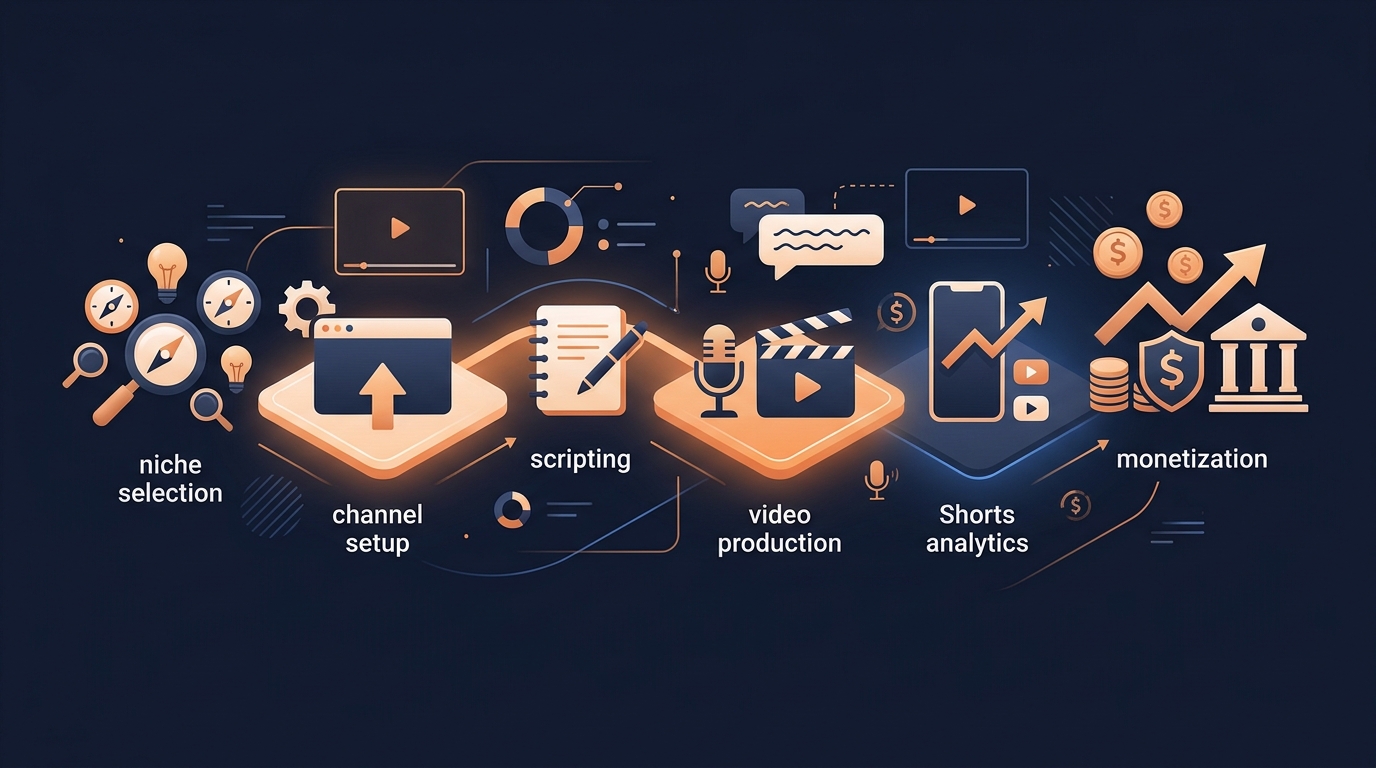
How to Build and Monetise a Faceless YouTube Channel
A practical map for building a faceless YouTube channel—from choosing a niche and making videos to growing on Shorts and creating multiple revenue streams.
Hoe je passief inkomen kunt opbouwen met een faceless YouTube-kanaal
Leer hoe je een faceless YouTube-kanaal kunt opbouwen met originele content, meerdere inkomstenstromen, SEO en beleidssamenwerkende workflows.